One system, two products
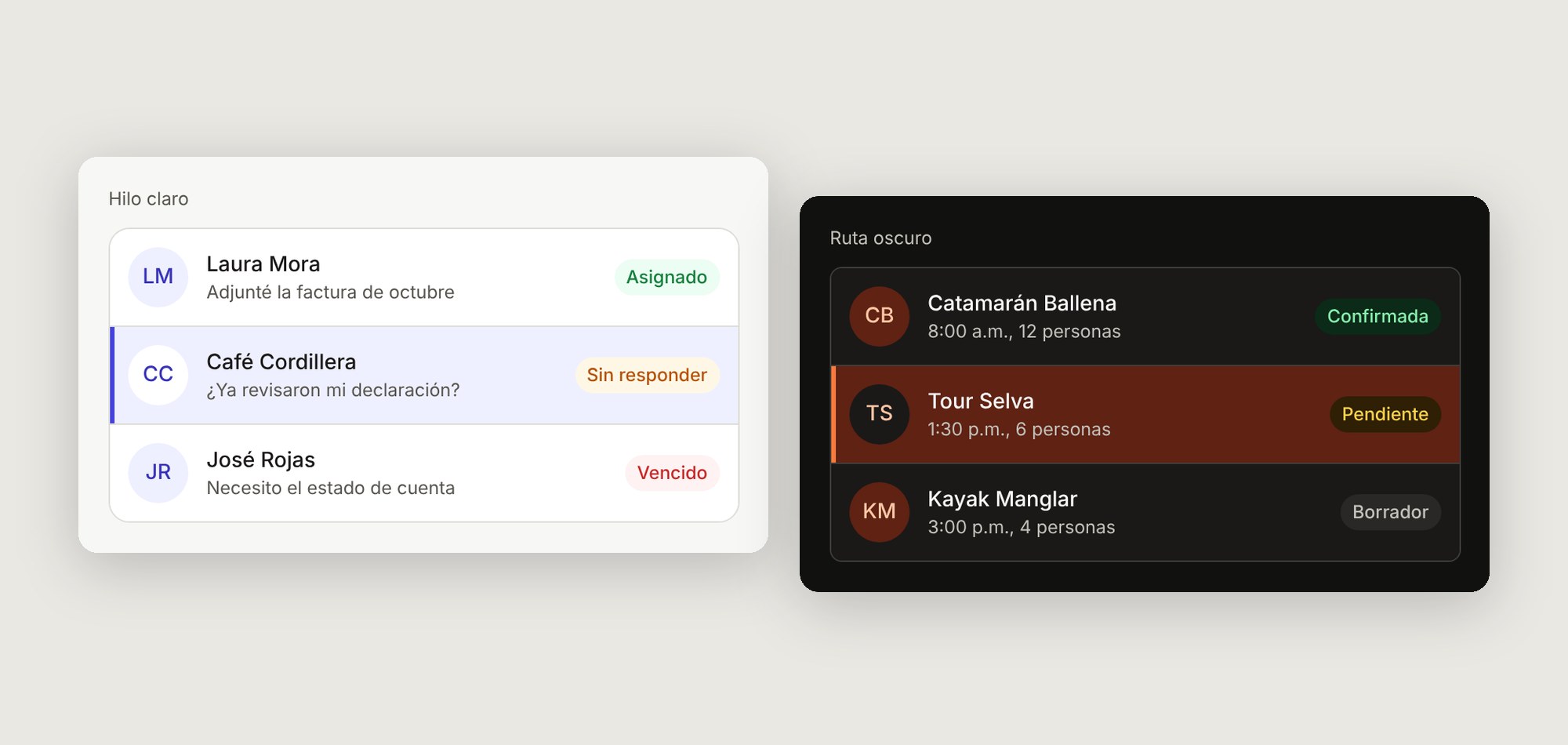
Trama is a multi-brand design system I designed and built end to end: one set of tokens and components that powers Hilo, a shared WhatsApp inbox for service teams, and Ruta, a booking panel for tour operators in Costa Rica.
Built on what I learned shipping real products
At GEXP Software I designed GoEasy Chat, a desktop SaaS that centralizes WhatsApp conversations for accounting teams. It has 50+ active users today and cuts in half the time staff spend scrolling to find their clients’ chats. I also built a design system there that was reused across every company project and cut delivery times by more than half.
I no longer have access to those files. Instead of recreating them from memory, I asked a better question: if I started over today, how would I build a system that serves more than one product from day one? Trama is my answer.
Small B2B teams end up building the same interface twice
A studio that ships several products usually starts each one from scratch: a new button, a new input, a new set of colors. Two products later, they look related but behave differently, and every accessibility fix has to be made twice.
Hilo and Ruta are a good test. They do different jobs, answering clients versus running the day’s tours, but underneath both are lists, statuses, filters and actions. They should share almost everything except their personality.
Goal: one source of truth that can change a product’s whole look by switching a theme, without touching a single component.
What the first version delivers
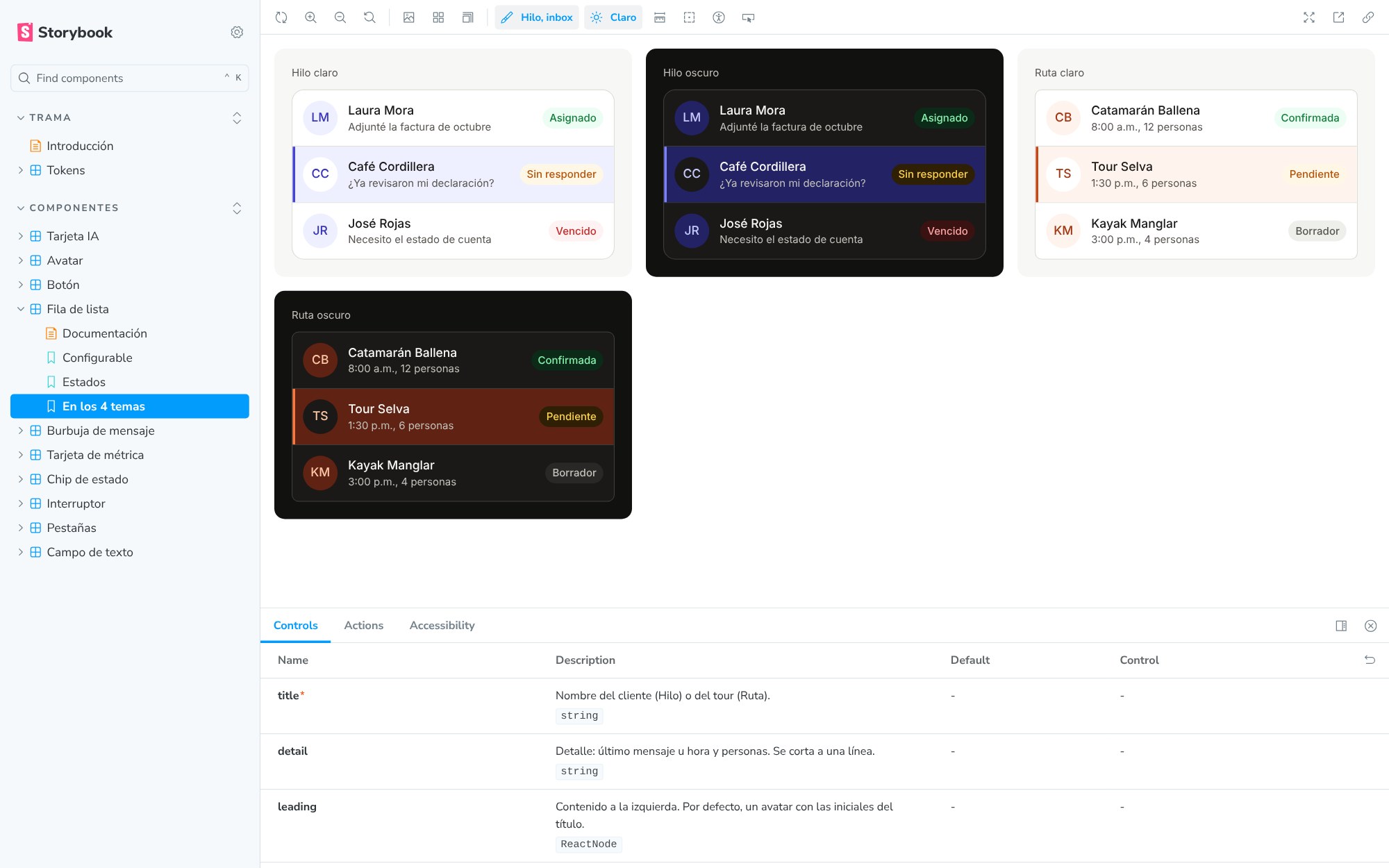
- 4themes from one codebase: 2 brands × light and dark
- 126design tokens, with the same names in Figma and code
- 36button variants: 3 styles × 3 sizes × 4 states
- 0violations in 63 automated accessibility checks (WCAG 2.2 AA)
Tokens in three layers
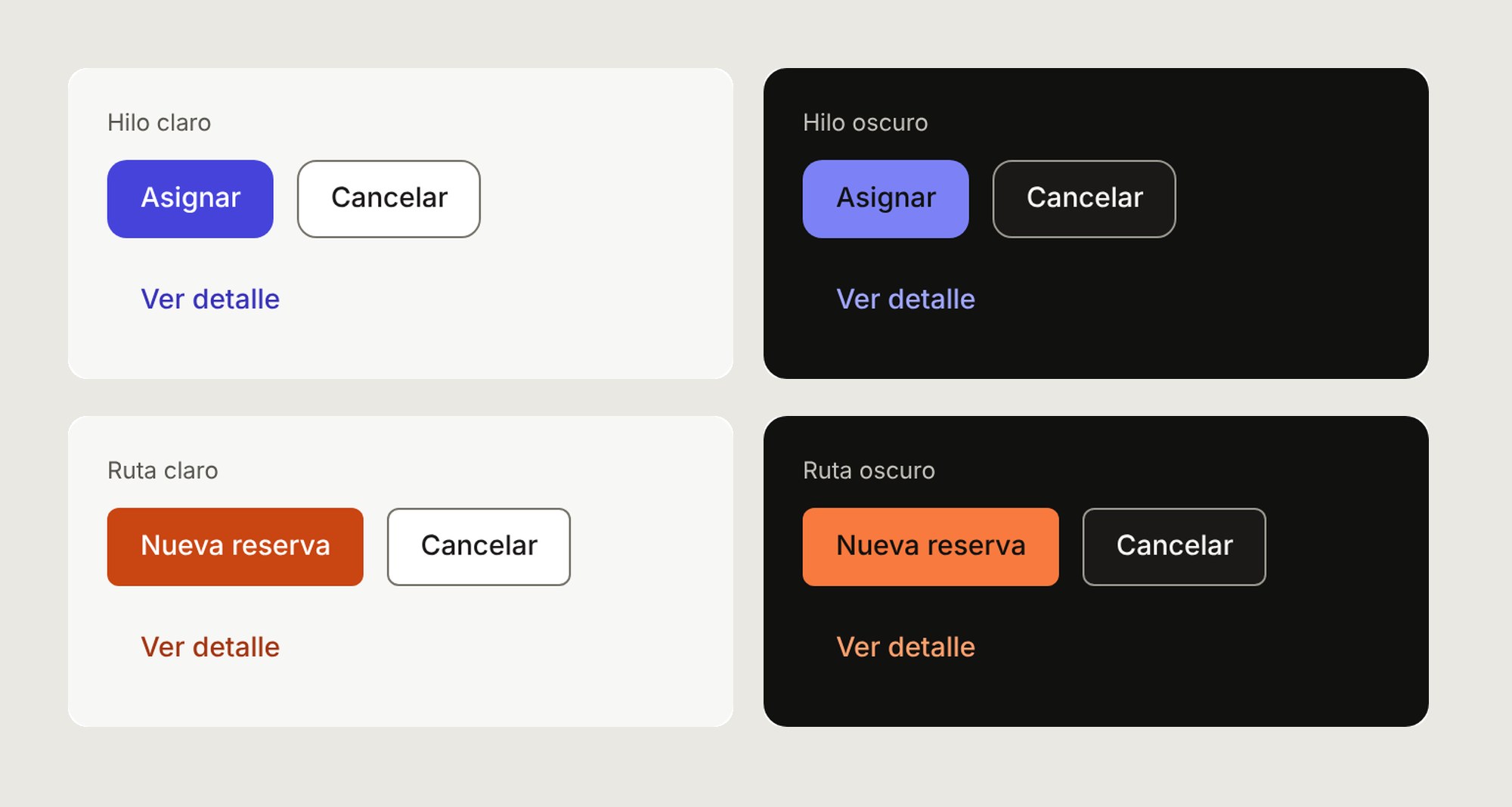
Every visual decision is a token, and components only read the top layer. Switching brand or color scheme just repoints the layers underneath, so the same button becomes Hilo’s indigo or Ruta’s sunset orange, in light or dark, with no code changes.
Primitives
Raw values. Never used directly in a component.
añil/600 = #4643DB · atardecer/600 = #C94512Brand
One mode per product. Repoints the brand ramp and the corner radius.
brand/600 → añil (Hilo) or atardecer (Ruta)Semantic
One mode per color scheme. Names describe the job, not the color.
action/primary → brand/600 (light) or brand/400 (dark)Components
Only read semantic tokens, so they never change between brands.
Button background = var(--color-action-primary)
The choices that shaped the system
One multi-brand system, not two
Most of the work in both products is the same: lists, statuses, filters and actions. Building it twice would double the maintenance, the bugs and the accessibility fixes.
Indigo for Hilo, not green
Green is WhatsApp’s color and also the system’s “success” color. Indigo keeps the brand distinct and the status colors unambiguous.
Personality through shape, not only color
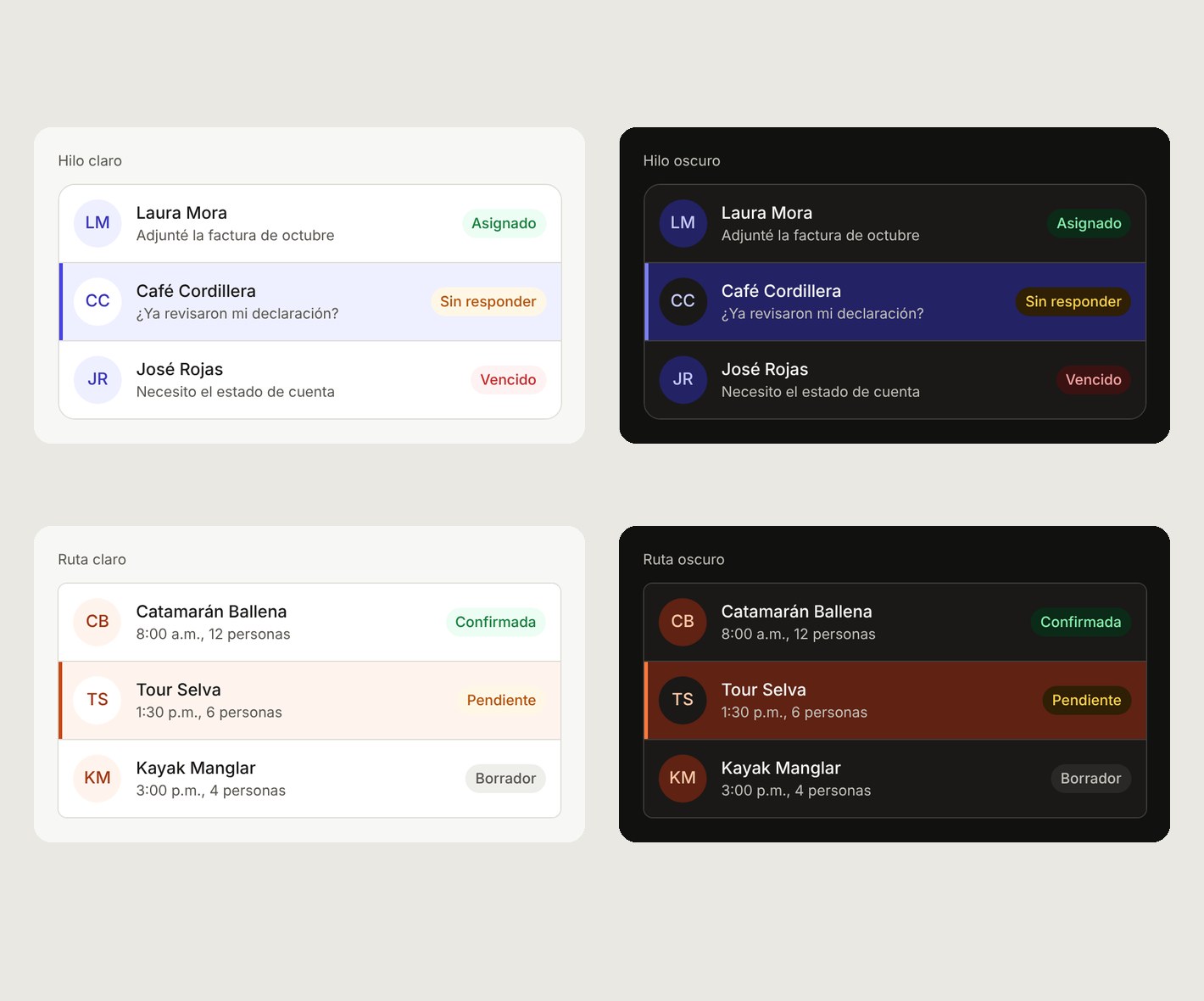
Hilo uses softer corners (10/14 px) to feel conversational. Ruta is squarer (6/8 px) to feel operational and precise. Two tokens carry that difference.
Three control sizes that line up
S (32 px) for dense rows, M (40 px) by default and L (48 px) for mobile, where a tour operator checks bookings from the dock. Buttons and inputs share the same heights, so they align in a row.
Errors never rely on color
A red border alone fails people with color blindness. Errors use a thicker border, a message that starts with “Error:” and aria-invalid, so they read the same on screen and in a screen reader.
Accessibility as a build step, not an audit
I checked every token pair against WCAG 2.2 AA in all four themes before designing a single component. That first pass caught two real problems: input borders at 1.4:1, when controls need 3:1, and placeholder text at 2.9:1. I split the tokens so decorative dividers and interactive borders could follow different rules.
Later, automated checks in Storybook caught one more: the helper text of a disabled field had faded to 2.7:1. That message often explains why a field is locked, so it has to stay readable. I fixed it in code and in Figma.

- Text at 4.5:1 or more, and control borders and focus rings at 3:1 or more, in every theme
- A focus ring offset 2 px from the control, the same in every component
- Targets of at least 24 px
- Color is never the only signal: chips carry text and selected rows add a side bar
- Animations turn off when someone asks for reduced motion
Five components, every state
The first set covers what both products need on day one. Each component has every size and state designed in Figma and built in React with the same names, so a variant in the design file is a prop in code.
Button
Primary, secondary and ghost, in S/M/L, with hover, focus and disabled states.
Text field
Label always visible. Hint and error messages are announced with aria-describedby.
Status chip
Success, warning, danger and neutral. Always carries text.
Avatar
Initials from the name. Decorative by default, so screen readers don’t repeat it.
List row
The same row is a client chat in Hilo and a booking in Ruta, with a selected state marked by a bar and aria-current.
One source of truth, five steps
The names match end to end. color/action/primary in Figma is var(--color-action-primary) in code, so a developer inspecting a design in Dev Mode sees the exact variable they will use.
- Figma variablesCollections with modes for brand and for light/dark
- Tokens JSONOne source of truth in the DTCG format
- Style DictionaryBuilds CSS variables in layers and a typed token list
- ReactComponents with size, variant and state props
- StorybookPublished on GitHub Pages; every push republishes it
AI-assisted, designer-led
I worked with Claude on the parts that are repetitive or easy to get wrong by hand: creating variables through the Figma API, writing the Style Dictionary build, scaffolding components and running contrast and accessibility checks.
I set the direction and made the calls: what to build, the token architecture, each brand’s personality, the three sizes and which trade-offs to accept. Every output was reviewed against the design. That is how I expect to work on a modern product team: AI speeds up production, and design judgment decides what is right.
Putting Trama to work
Trama is the foundation for two products. Hilo, a shared WhatsApp inbox with an AI that summarizes conversations and flags urgent clients, is already designed and prototyped only with Trama’s components, and it added five new ones back to the system. Ruta, the booking panel, followed with the same components in its own brand.
What I learned
- Check accessibility at the token level. Fixing a contrast pair once fixes it in every component and every theme.
- Name things once. When Figma, JSON and CSS share names, handoff stops being a translation exercise.
- Personality lives in very few tokens. A brand ramp and two radii were enough to make two products feel different.