
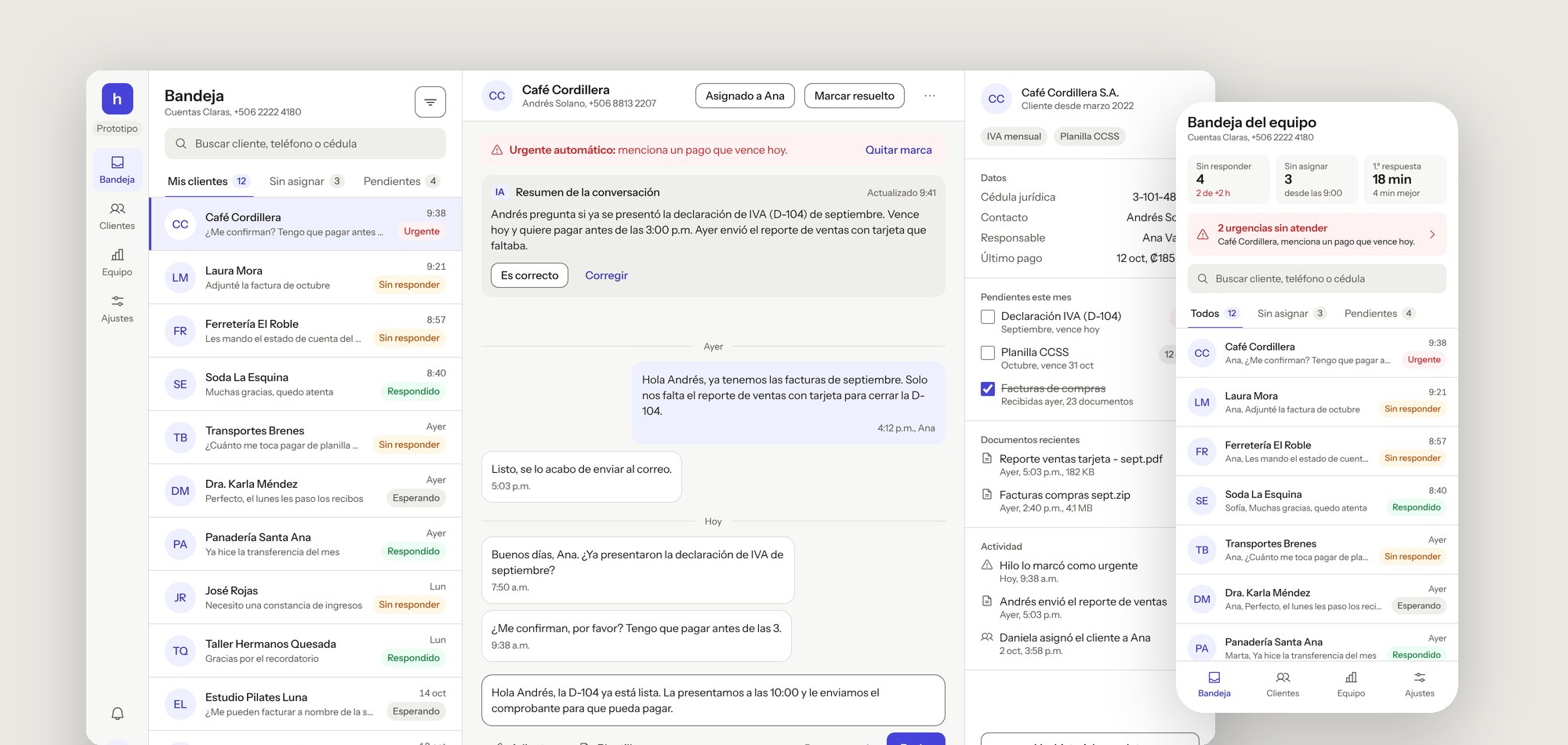
The AI suggests, a person decides
Hilo is a shared WhatsApp inbox for small accounting firms in Costa Rica, with an AI layer that summarizes conversations, suggests who should answer and flags clients with a deadline today. I designed it end to end and built a working prototype with my own design system, Trama.
Where accounting firms really talk to clients
In Costa Rica, small accounting firms run on WhatsApp. Clients send invoices, ask how much they owe in taxes and remind their accountant of deadlines, all in one chat on one shared phone.
I saw this up close designing GoEasy Chat at GEXP Software, a desktop app that centralizes those conversations for accounting teams. Hilo is what I would build next: the same job, rethought for a team of five with an AI that helps without taking over.
When everyone can answer, nobody does
A shared inbox has no owner per chat. Two people answer the same client, or nobody does. The owner only finds out a client was waiting when that client calls, upset, on the day a tax filing is due.
Deadlines make it worse. A message that says “I have to pay before 3” looks like any other message in the list, and a missed IVA filing means a fine for the client and a lost client for the firm.
Goal: every chat has an owner, urgent clients surface on their own, and the owner can see in seconds who is falling behind, without the AI ever speaking for the firm.
What the prototype covers
- 6screens: 5 for desktop and a mobile inbox for the owner
- 5new components added back to Trama, in Figma and React
- 1action the AI takes on its own: flagging urgent chats
- 0accessibility violations in 7 automated checks of the live prototype
Two people, two different questions
The agent
“Which client do I answer next, and what do they need?”
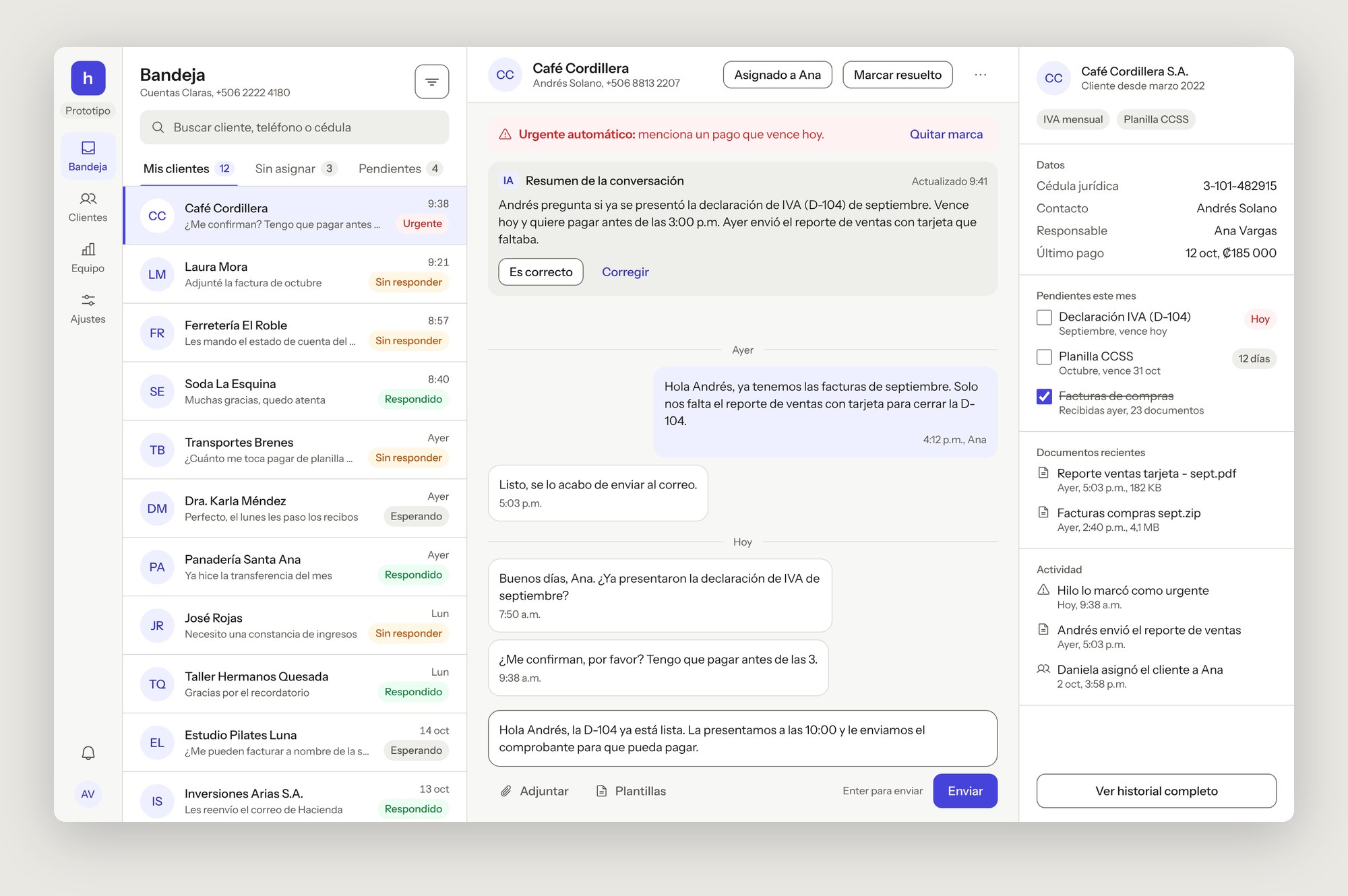
Ana handles about 14 clients a day. She needs her chats, the context to reply without reading the whole thread, and the client’s pending filings at hand.
The owner
“Is anyone being left waiting, and who can take more?”
Daniela runs the firm and assigns new clients. She checks the team from her phone between meetings and steps in when someone is overloaded.
One rule: the AI suggests, a person decides
I wrote the rules before drawing any screen. For each thing the AI could do, I asked what a mistake would cost and whether it can be undone. Only one action passed that test to run on its own.
| What the AI does | Who decides | Why |
|---|---|---|
| Summarize each conversation | The agent confirms or corrects it | Saves reading a long thread, but a wrong summary must never become the record. |
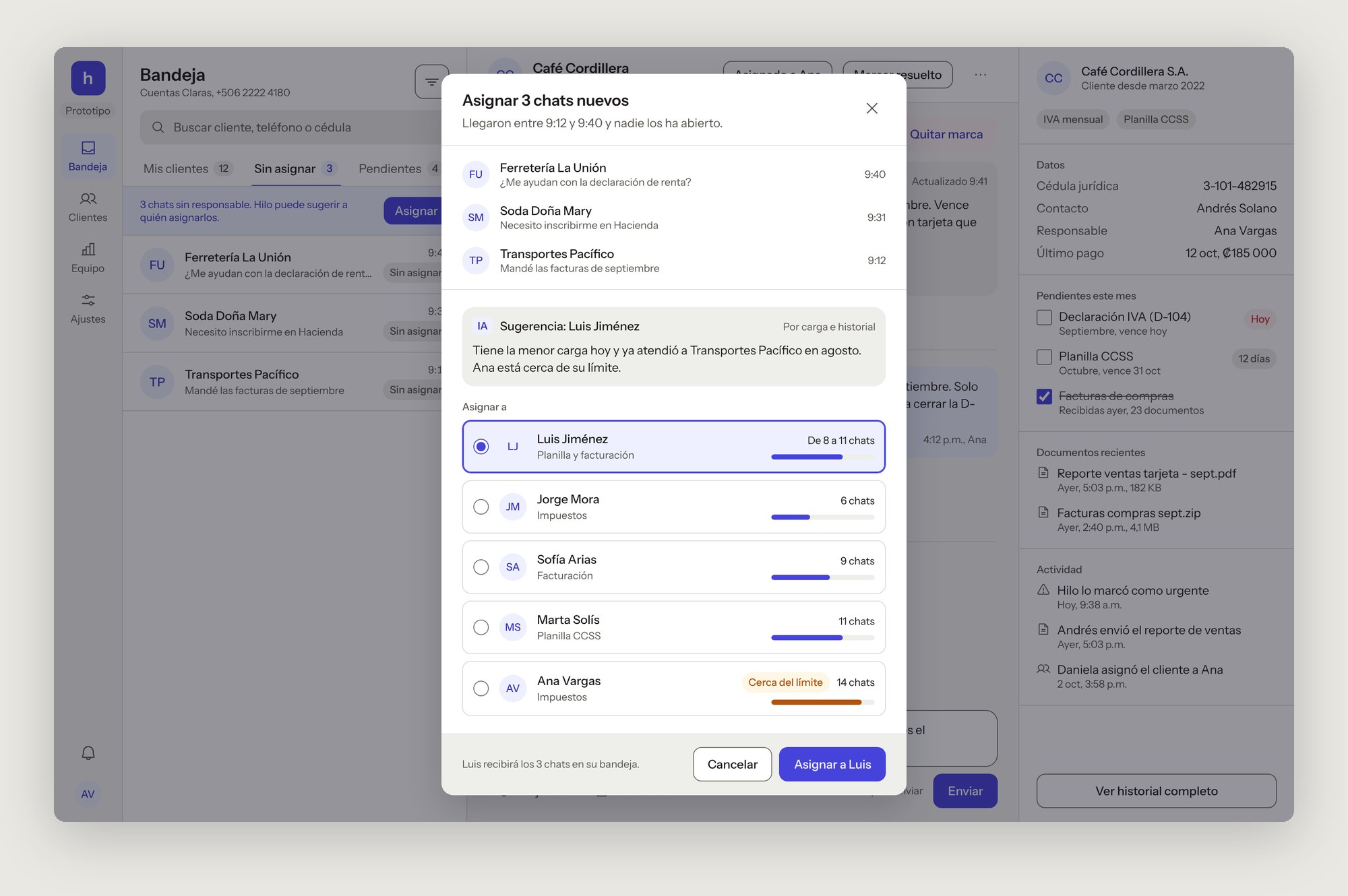
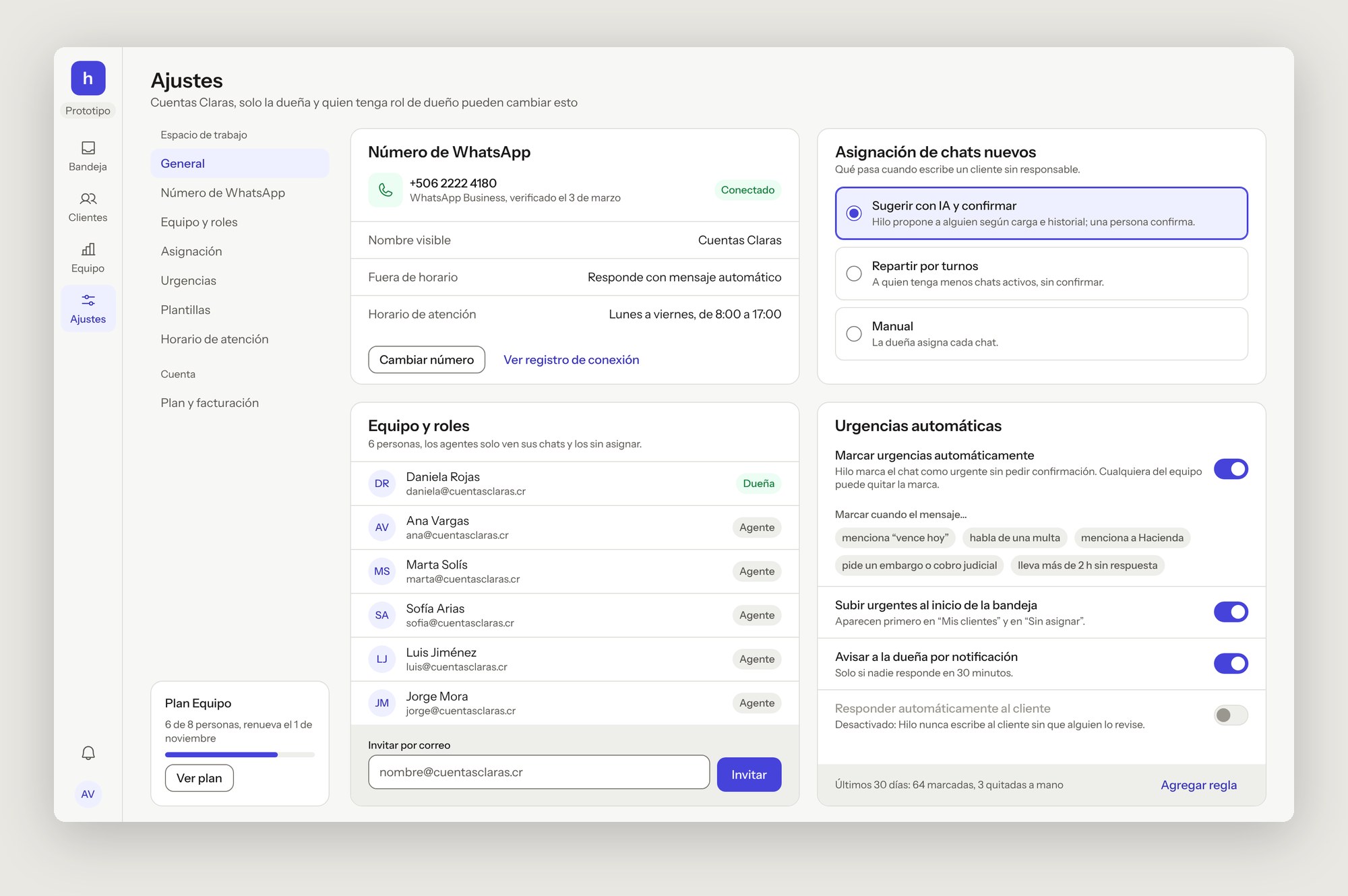
| Suggest who gets a new chat | A person confirms the assignment | Uses each person’s load and history with the client. The owner knows things the data doesn’t. |
| Draft the owner’s daily report | The owner edits and sends it | The report goes to the whole team, so it carries the owner’s voice. |
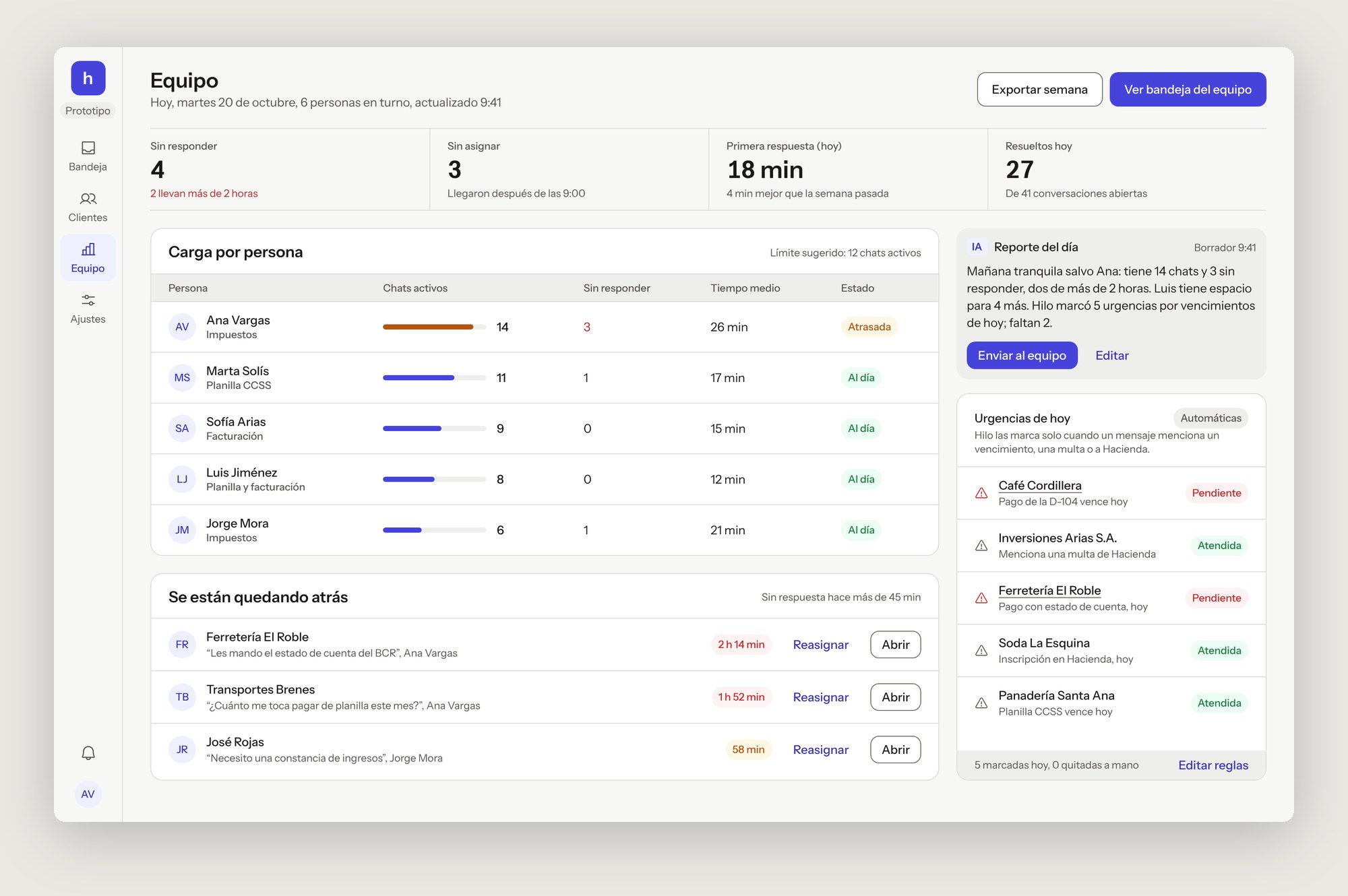
| Flag urgent chats | Automatic. Anyone can remove the mark | Missing a tax deadline costs far more than a false alarm. Removals are counted, so the rules can be tuned. |
| Reply to clients | Never | Off and locked in this version: an accounting firm can’t send advice nobody reviewed. |
From the next reply to the whole team
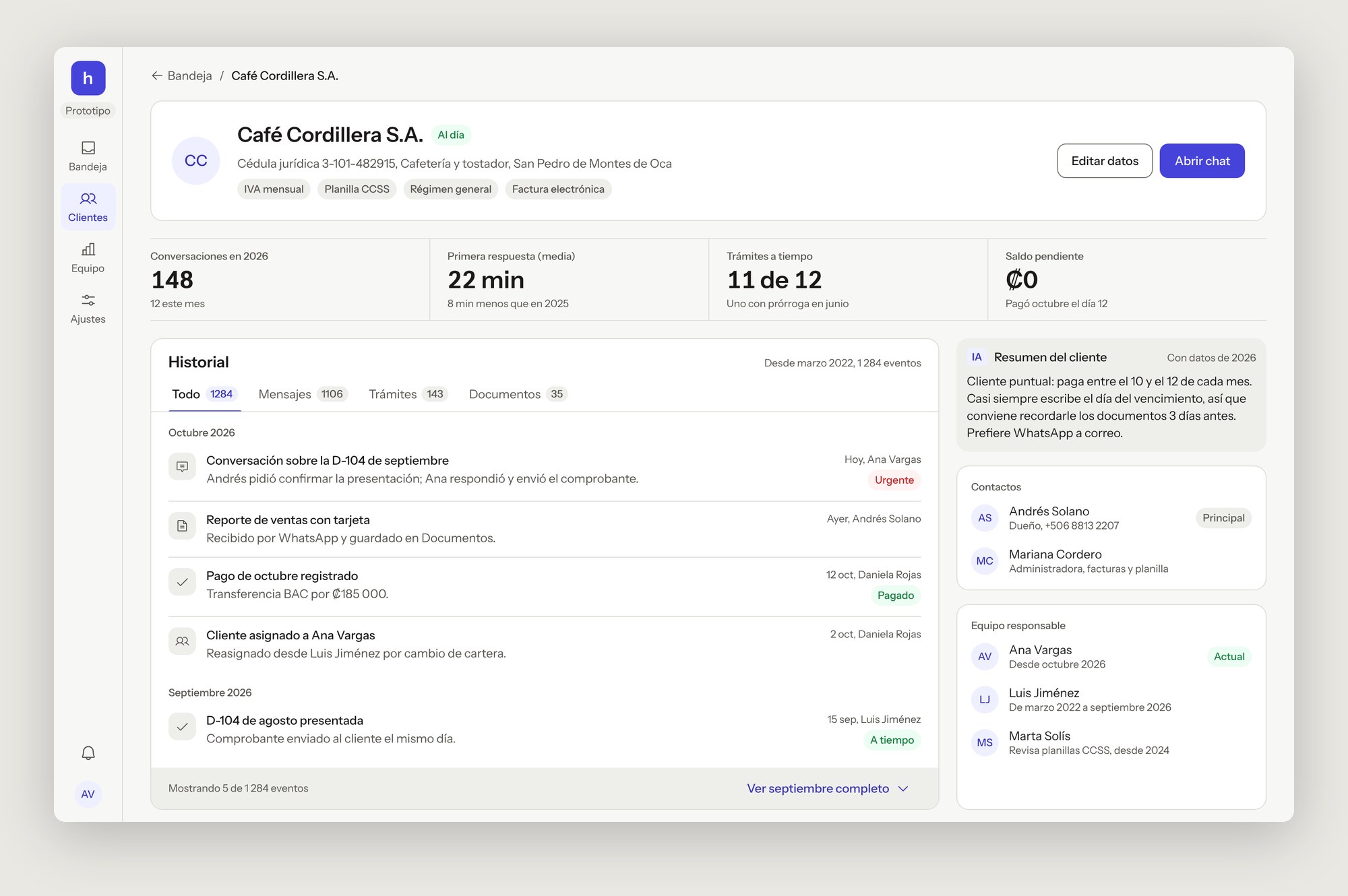
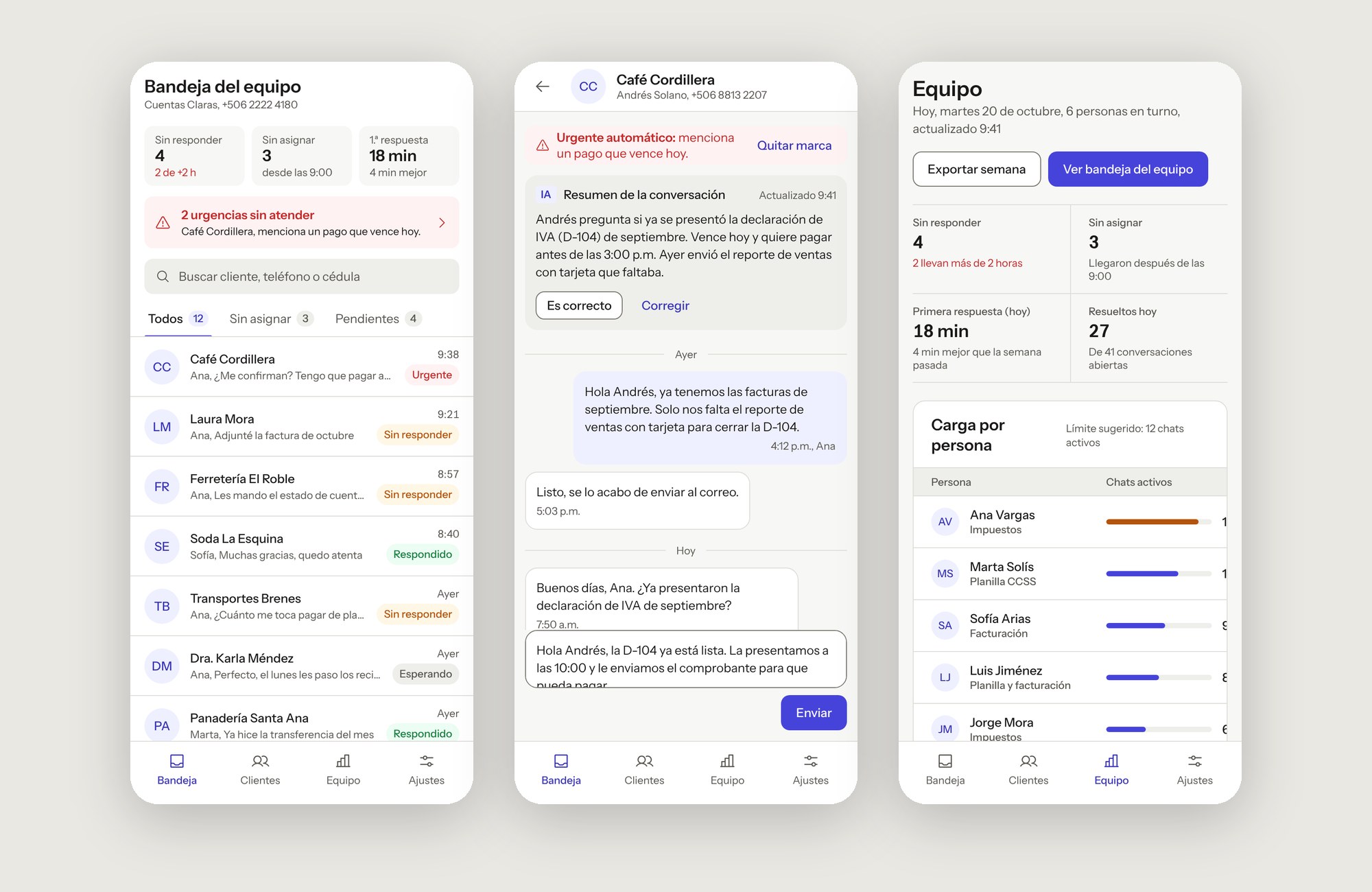
Every screen uses real content: Costa Rican tax filings (D-104, CCSS payroll), amounts in colones and names that are long enough to break a layout. All of them come from the working prototype.
The choices that shaped Hilo
The urgent notice sits above the thread, not inside it
An urgent mark buried between messages gets scrolled past. Pinned above the conversation, with the reason in plain words, it is the first thing the agent reads.
AI is labeled with text, not sparkles
Every AI output carries an “IA” badge and a screen reader label that says it was generated. No gradients or glows: in an accounting office, trust comes from looking like a tool, not a toy.
Assignment shows the load before and after
Each person has a load bar and the count changes as you pick (8 → 11 chats). The owner sees the cost of a choice before making it, and who is near their limit.
The owner gets a different view, not more filters
Agents need the next chat to answer. The owner needs to know who is falling behind and act on it, so the team view leads with load, waiting chats and a reassign button.
Mobile is for the owner, not the agents
Agents work at a desk. The owner checks in between meetings, so the mobile inbox opens with three numbers and the one urgent chat nobody has answered.
The product fed the system back
Hilo is built only with Trama’s components and tokens. When a screen needed something the system didn’t have, I added it to Trama first, in Figma and in React with Storybook docs, and then used it in Hilo. The list row also gained a time, and the system a scrim token for dialogs.
AI card
A text “IA” badge, a timestamp and optional confirm actions.
Message bubble
Incoming and outgoing, with time and who replied. Announces its side to screen readers.
Tabs
With counts, arrow-key navigation and an underline that doesn’t rely on color.
Metric card
Label, value and a one-line note, as a definition list.
Switch
role="switch", a required label and a linked description.
Usable with a keyboard and a screen reader
Trama already covered contrast and focus. The product added the harder part: flows. I tested them with the keyboard and with automated checks on every screen, the dialog and the mobile views.
- The assignment dialog traps focus, closes with Esc and returns focus to the button that opened it
- Tabs move with the arrow keys, Home and End
- Urgency is never only red: the notice says why in words, and chips always carry text
- A skip link jumps past the navigation, and each screen moves focus to its content
- Every AI output is announced as generated by AI
Testing it with real firms
The next step is to put the prototype in front of three accounting firms and watch them assign and answer a morning’s chats. The questions I most want answered: do agents trust the summaries enough to skip the thread, and do the urgency rules catch the right messages?
What I learned
- Decide what the AI may do alone before designing a single screen. It changed the layout of every view.
- A design system proves itself in the second product. Hilo needed five components Trama didn’t have, and now Ruta gets them for free.
- Real content finds problems placeholder text hides: long client names, tax terms and amounts in colones broke three layouts.